

Sulvo units allow you to control the device where ads should show
During initial ad unit set up, or when placing the ad code on your site, you have the option to set which devices the ad should show.
You have 3 device options:
Mobile
Tablet
Desktop
Setting the device during ad creation
Some ad units, like Sticky Display and Sticky Mobile, come preconfigured to show on the correct devices. Others can be easily configured when copying the ad code.
Steps:
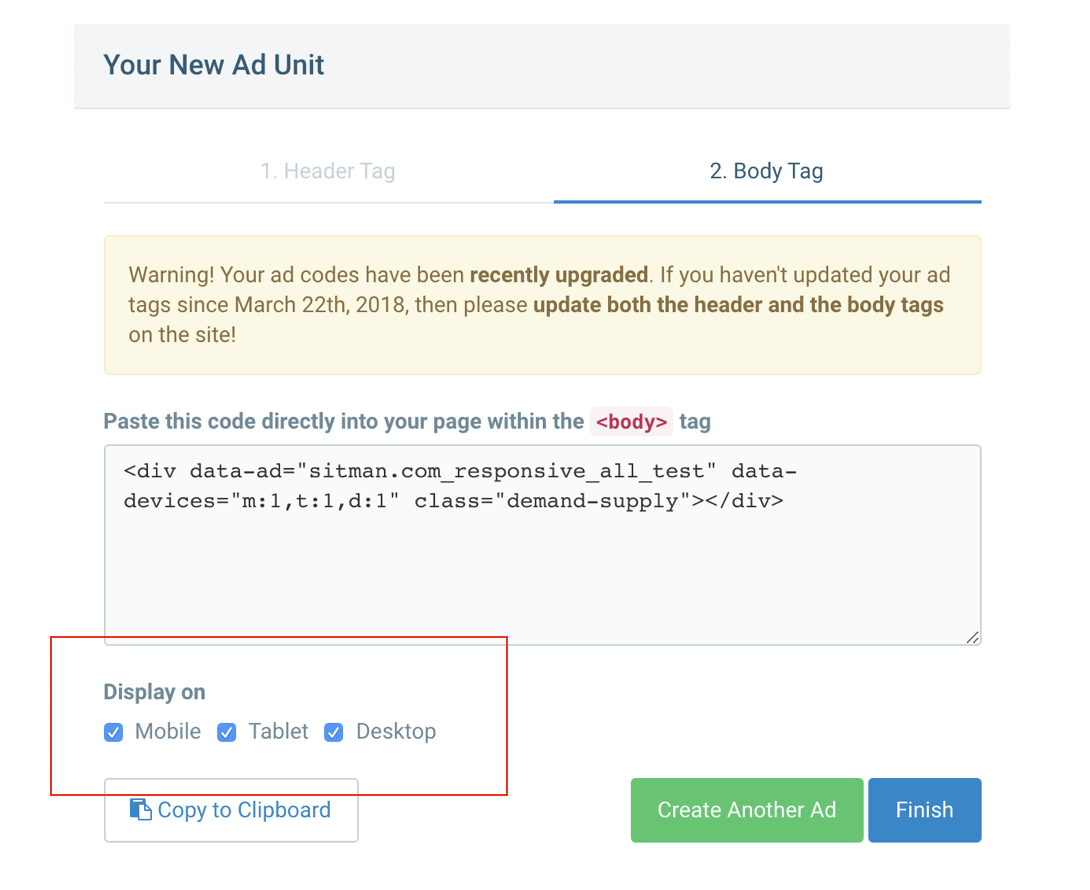
After creating your ad unit you are prompted to copy the code, both the header and body tags.
Under the "Body Tag" you are given the option to display on 3 devices.
Select the devices to show, then copy and paste the Body tag on your site.
Setting the device after placing the Body Tag
If you have already placed the Body Tag and need to update the device you have a few options:
Update the devices in the Sulvo interface, copy and replace the code (similar to above)
Modify the Body Tag directly on the page.
data-devices="m:1,t:1,d:1"determines on which devices the ad should show1 = show ad
0 = do not show ad
You may change this directly in your source code
Note: Take caution manually changing any ad code as errors may impact revenue. Also, any changes made directly on the page source code will not be reflected in the Sulvo interface.